I manage about 30 WordPress sites for retainer clients, friends and family, and various projects I’m involved in.
As I wrote about in my post about managing WordPress sites for agencies, once you’re responsible for more than a handful of sites, even simple maintenance tasks start to become repetitive.
Security updates are a good example. A vulnerability is announced in a popular WordPress plugin and I need to figure out which sites have it installed, which version they’re running, and then update them. My sites are spread across several different servers, so doing this one site at a time gets tedious pretty quickly.
I already use WP-CLI for most WordPress maintenance, so I wanted a way to run the same WP-CLI command across all of my sites at once.
Running WP-CLI across multiple sites
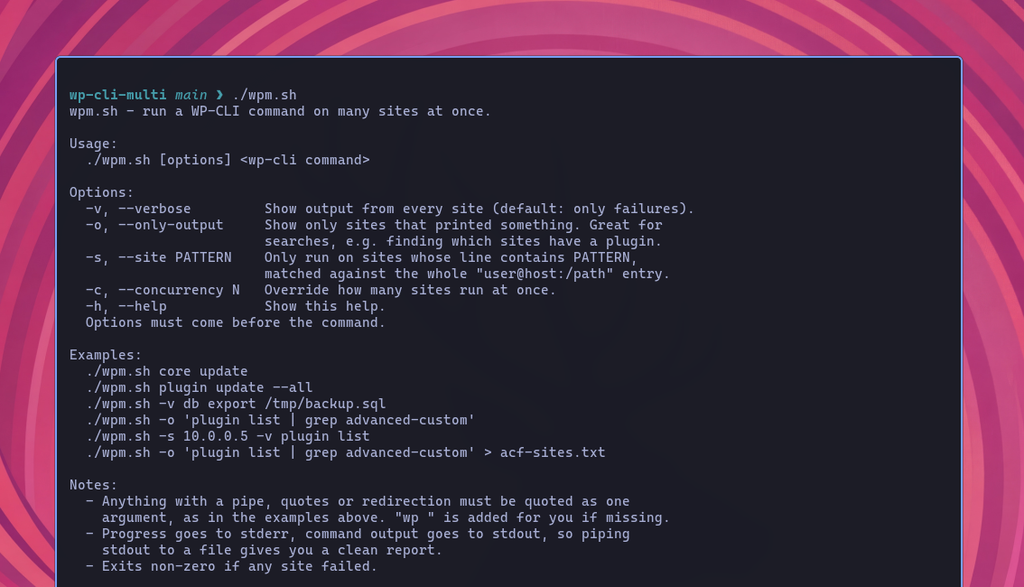
I wrote a small Bash script called wpm.sh.
It’s a self-contained script that connects to multiple servers over SSH and runs WP-CLI commands against the configured WordPress sites concurrently.
For example, I can force a minor WordPress core update across every site:
./wpm.sh core update --minor --forceOr update every plugin:
./wpm.sh plugin update --allBecause the arguments are passed through to WP-CLI, I’m not limited to updates. I can use it for pretty much anything I’d normally do with wp on an individual site.
Finding a vulnerable plugin across all WordPress sites
One of the main reasons I wrote the script was security updates.
If there’s a vulnerability in Advanced Custom Fields, for example, I can quickly find every site where it’s installed:
./wpm.sh -o 'plugin list | grep advanced-custom' > acf-sites.txtInstead of logging into 30 sites individually, I get a list of the affected sites in one go.
The same approach works for checking plugin versions, WordPress core versions, active themes, users, options, cron events, or anything else WP-CLI can query.
Configuring the sites
The configuration deliberately lives inside the script itself:
SITES="
karl@wpshell.com:/sites/wpshell.com/public_html
karl@kubeadm.org:/sites/kubeadm.org/public_html
#deploy@10.0.0.5:/srv/old/public
"
Each entry contains an SSH destination followed by the path to the WordPress installation.
The script assumes SSH key authentication is already configured for each server. That’s how I access these sites normally anyway, so there are no additional credentials or agents to manage.
Why not use a WordPress management plugin?
There are plenty of WordPress management services and plugins that can handle updates across multiple sites.
I didn’t really want another one.
I already have SSH access and WP-CLI on every server. Installing another plugin or connecting every site to a third-party management service just so I can run commands remotely seemed unnecessary.
It’s the same reason I prefer handling things like WordPress backups at the server level rather than installing a backup plugin on every site.
wpm.sh does one thing: it takes the WP-CLI commands I already use and runs them across all of my WordPress sites.
That’s pretty much it.
Get the script
You can grab wpm.sh from GitHub.
It’s open source under GPLv3, and the whole thing is small enough to read before you run it.
If you manage a bunch of WordPress sites over SSH, you might find it useful too.